Catch short dates before your customers do
For convenience stores, delis and grocers. Instead of walking every aisle every day, your staff check one list and do what it says.
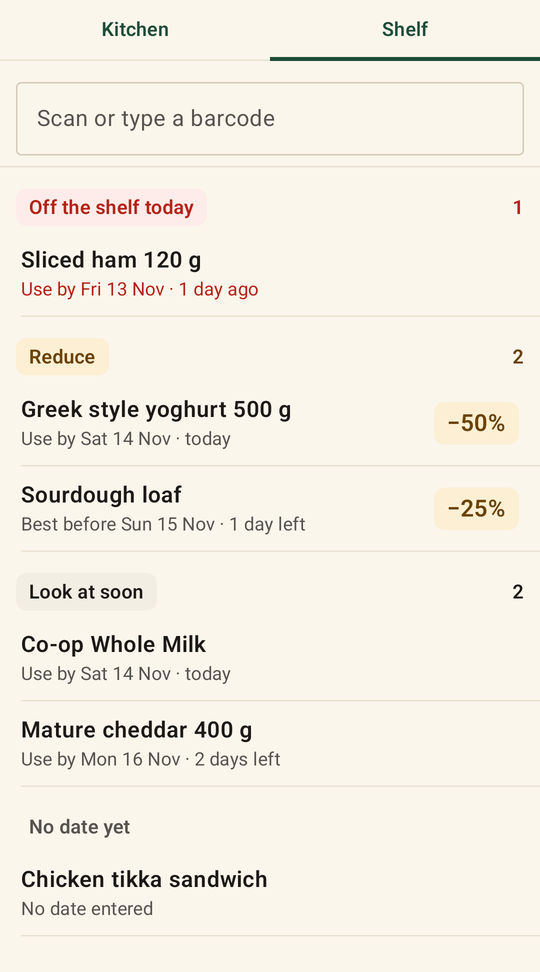
Every morning
One list, three kinds of job
Only the short-life food you choose is checked: dairy, bread, deli, sandwiches and ready meals.
- Off the shelfUse-by food past its date. It must come off today.
- ReduceFood a reduction applies to, by your own rules, such as 25% off with a day left and 50% on the day. Best-before food past its date is reduced, not removed.
- Look at soonFood getting close to its date, so it can be moved to the front.
- Scan and type the date as on the pack“1411” is 14 November. Only the nearest date on the shelf is needed, one per product.
- Product names fill themselves inFrom the barcode, using Open Food Facts, a free open food database. If a name isn't found, staff type it once.
- The reduced price, worked outThe normal price is asked once, the first time a product is reduced. After that the handheld shows the old and new price.
- Remove, return or donate in one tapAdd how many if you like, then the handheld asks for the next nearest date.
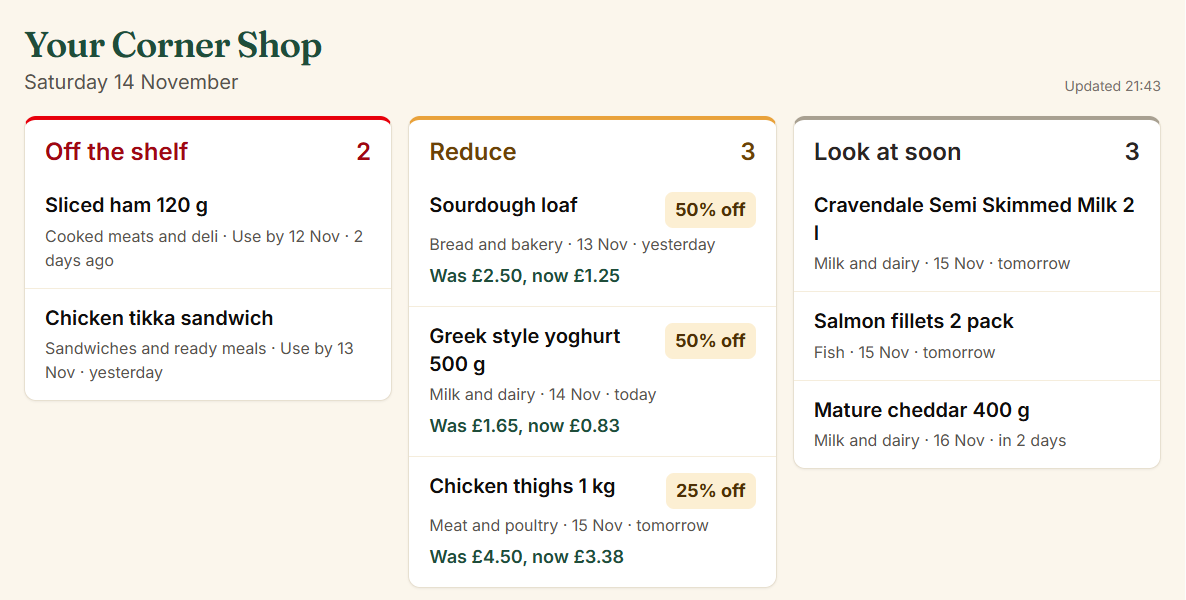
The shop board
Today's jobs on any tablet in the shop
Open the board on a tablet behind the counter or in the stockroom and connect it once with a code. It updates every minute and keeps the screen on. A job leaves the board as soon as it's done on the handheld.
The waste report
See what you keep throwing away
What was removed, donated or returned, and what was reduced, product by product and at your normal shelf price. The products at the top are the ones to order less of. Download every record as a spreadsheet.
Removed
Thrown away, with the value at shelf price.
Reduced
Sold on instead of thrown away.
Donated
Given to a food charity or staff.
Returned
Sent back to the supplier.
Coming next: Larderby Price
Shelf prices that keep up with your invoices
Photograph a supplier invoice. Larderby reads the new costs, suggests prices with your own margins, prints labels only for what changed and gives your till an updated price list. We are building it with our first shops now.
Questions shops ask
Do we have to scan every product in the shop?
No. Only the short-life categories you choose, such as dairy, bread, deli and ready meals, and only the nearest date on the shelf for each product.
Does it need our till?
No. Larderby Shelf works on its own. Larderby Price, coming next, will send updated prices to your till.
Can we use our own reduction rules?
Yes. Each category has its own rules, such as 25% off with a day left and 50% on the day, and whether its date is use by or best before.
Does it need internet?
Checking dates and recording what you did work without internet; the records are sent when the handheld is back online. Adding a product for the first time needs a connection.
See it on a real shift
We show you Larderby on the handheld, on a video call or at your premises in London. Founding shops get the yearly price on monthly billing, fixed for 24 months.